FOR COMMERCIAL USE, PLEASE ENSURE YOU HAVE A COMMERCIAL LICENSE.
ANOTHER WAY TO SUPPORT MY WORK IS BY PURCHASING MY BOOK, CUSTOMER FIRST, VALUE NEXT.
THANK YOU FOR SUPPORTING MY WORK!
Tutorial Math Collection API spec Download
mXparser “Hello World!” C++/CLI tutorial using Visual Studio 2015.
#include "stdafx.h"

using namespace System;
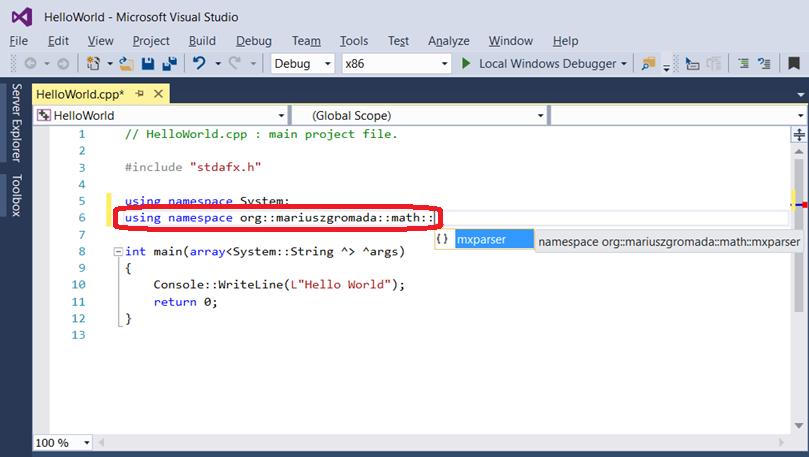
using namespace org::mariuszgromada::math::mxparser;

int main(array<System::String ^> ^args)
{
   Expression ^eh = gcnew Expression("5^2 * 7^3 * 11^1 * 67^1 * 49201^1");
   Expression ^ew = gcnew Expression("71^1 * 218549^1 * 6195547^1");
   String ^h = mXparser::numberToAsciiString(eh-&>calculate());
   String ^w = mXparser::numberToAsciiString(ew-&>calculate());
   mXparser::consolePrintln(h + " " + w);
   return 0;
}
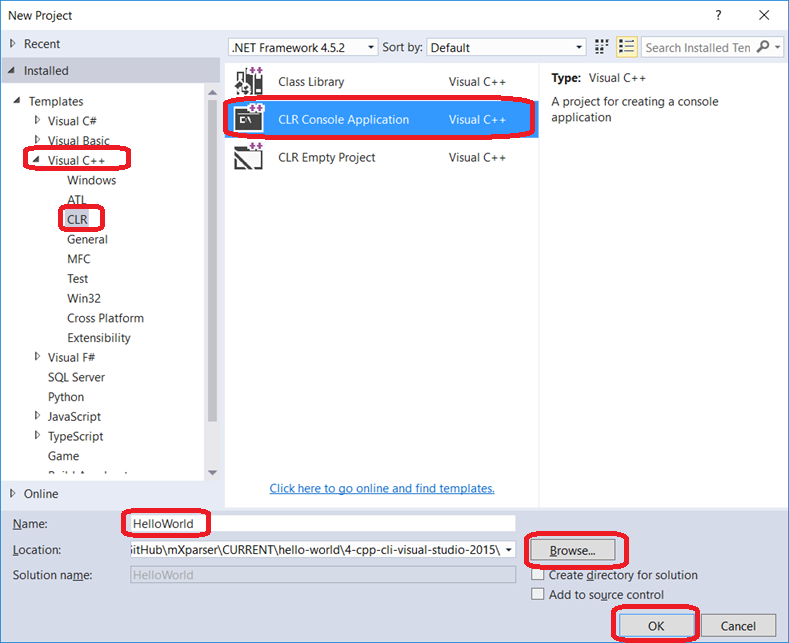
Step 1.1 Create new project.

Step 1.2. Select “Visual C++ / CLR” and “Console Application”. Input “Project name” and browse “Project location”.
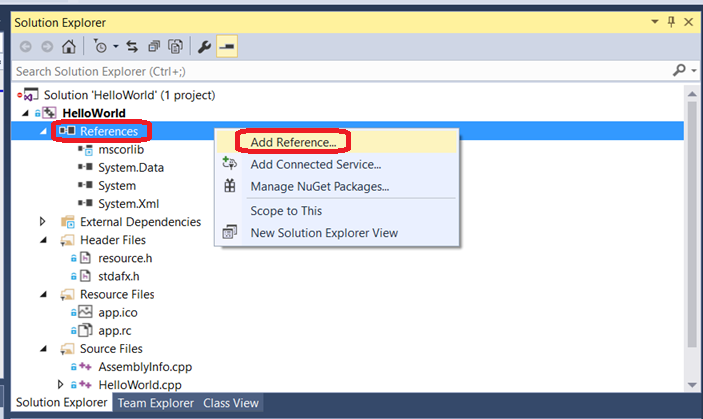
Step 2.1. Reference “mxparser.dll” library.
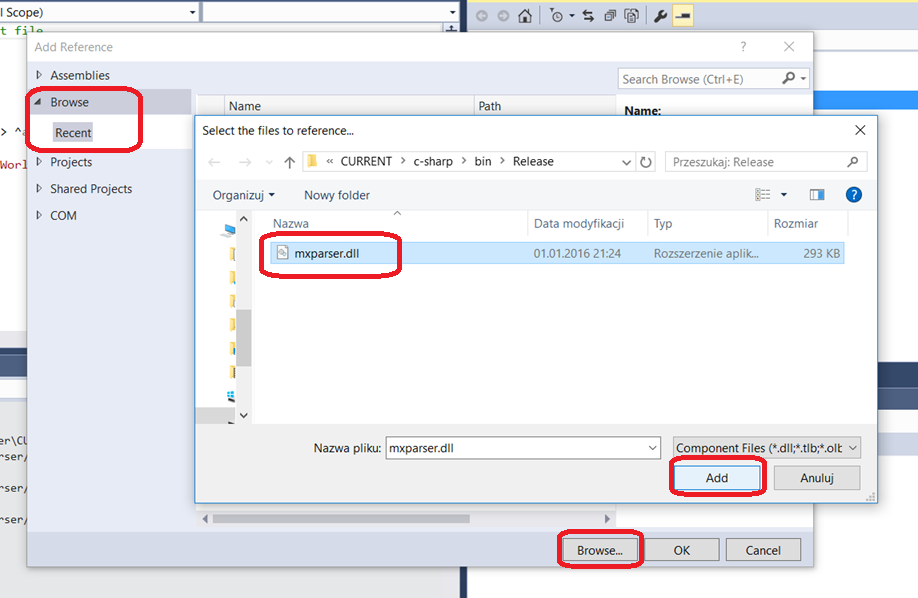
Step 2.2. Pickup location of the “mxparser.dll” file.
Step 2.3. Click “Ok” and your project is ready to code!

Step 3.1. This is a code draft of your class.
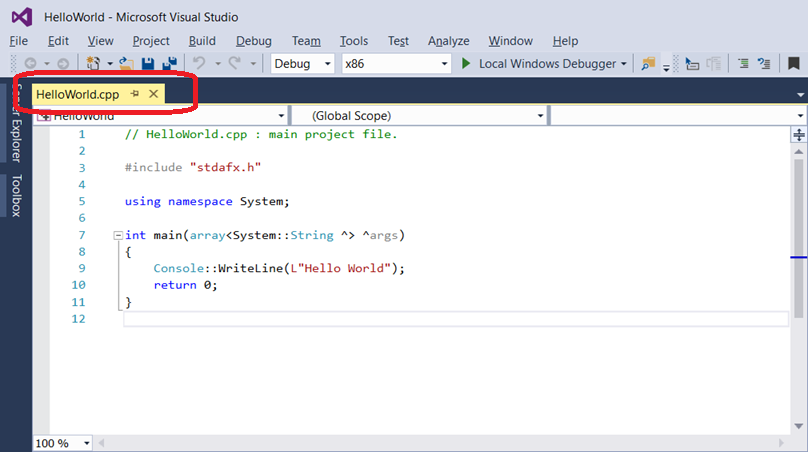
Step 3.2. This is a code draft of your class.Import “org.mariuszgromada.math.mxparser” package – you should see code completion hints while typing.
Step 3.3. Write the full “Hello World!” code.

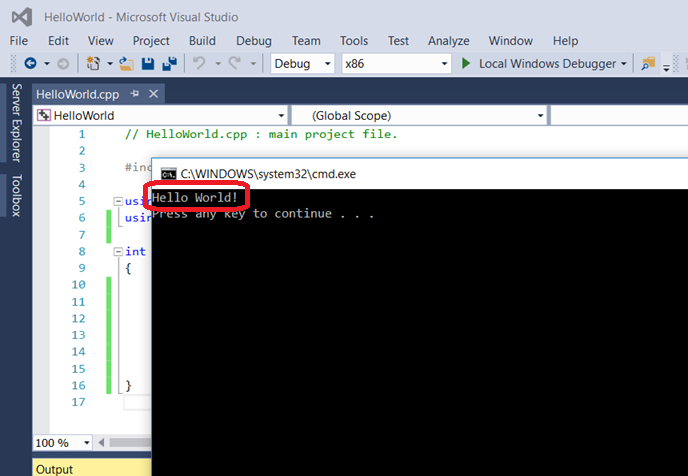
Step 4.1. Run the project.

Step 4.2. Check whether “Hello World!” text was displayed!
Step 5. Enjoy using mXparser 🙂
Nuget – Package Manager (C#, F#, Visual Basic, …)
Install-Package MathParser.org-mXparser-Version 6.1.2
dotnet add package MathParser.org-mXparser--version 6.1.2
<PackageReference Include="MathParser.org-mXparser"Version="6.1.2"/>
Maven – Dependency (Java, Kotlin, Scala, Groovy, …)
<dependency>
<groupid>org.mariuszgromada.math</groupid>
<artifactid>MathParser.org-mXparser</artifactid>
<version>6.1.2</version>
</dependency>
Maven – Gradle
implementation 'org.mariuszgromada.math:MathParser.org-mXparser:6.1.2'
CMake – Dependency / FetchContent (C++, MSVC, LLVM/Clang, GNU/GCC, MinGW, MSYS2, WSL, Windows, Linux, Unix, MacOS)
include(FetchContent)
FetchContent_Declare(
MathParserOrgMxParser
GIT_REPOSITORY https://github.com/mariuszgromada/MathParser.org-mXparser.git
GIT_TAG v.6.1.2
 SOURCE_SUBDIR CURRENT/cpp/lib
)
FetchContent_MakeAvailable(MathParserOrgMxParser)
mxparser_link(YourExecutable)
GitHub
git clone https://github.com/mariuszgromada/MathParser.org-mXparser
OTHER DOWNLOAD OPTIONS
Download latest release – v.6.1.0 Sagitara: .NET bin onlyDownload latest release – v.6.1.0 Sagitara: JAVA bin onlyDownload latest release – v.6.1.0 Sagitara: bin + doc
NEWS FROM MATHPARSER.ORG
SOURCE CODE
Source code .zipSource code .tar.gz
View on GitHubMathSpace.pl